FOR SMALL B2B SALES TEAMS
An AI-native CRM that helps your team decide what to do next.
Keep leads, contacts, deals, and follow-up tasks in one place. Review deals that need attention, see suggested next steps, and connect a compatible AI assistant to your CRM.
Invitation-only · 30-day trial after workspace activation · Up to 10 users · No credit card required
YOUR DAILY SALES WORK
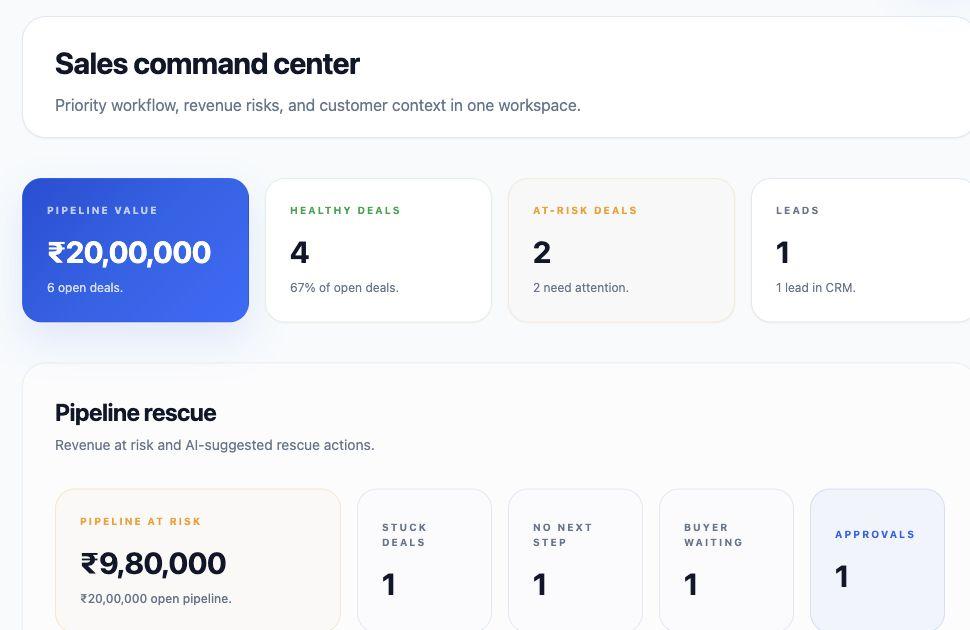
Keep track of customers, deals, and next steps.
Organize your sales records, check what needs attention, and review suggested actions.
Keep customer records together
Manage leads, companies, contacts, and deals. Assign owners, add notes, and track follow-up tasks.
Find deals that need attention
Review deal risks and suggested next steps. See the information behind each suggestion.
Review suggestions before making changes
Use the AI Queue to review suggested tasks and deal updates. Check what will change before approving.
A SALES FOLLOW-UP EXAMPLE
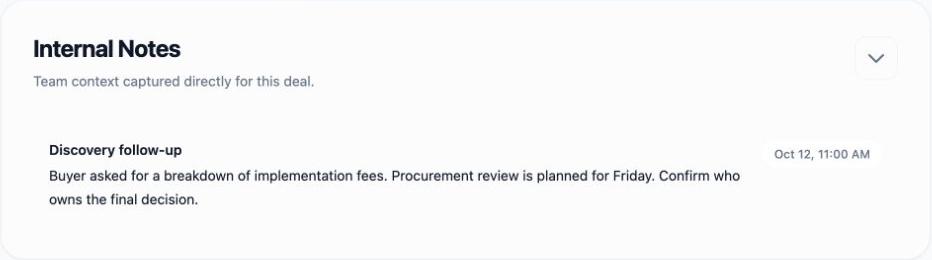
A buyer has a pricing question. What happens next?
See how a saved deal note can lead to a suggested follow-up task.
AI ASSISTANTS
Ask an AI assistant about your deals.
Connect a compatible AI assistant to LeadWise. It can use CRM records you have permission to access, help you review deals, and suggest follow-up tasks.
Find customer information
Ask about companies, contacts, deals, tasks, and saved activity without copying each record into a chat.
Review a deal
Ask the assistant to examine the deal information it can access and explain what may need attention.
Suggest a follow-up
Ask for a task or deal update. Review the suggestion in LeadWise before approving it. The assistant cannot approve its own suggestion.
You need a compatible assistant. Its available models and any separate subscription depend on the service you use.
Example request & answer
“Which deals need attention this week? Explain why and suggest follow-up tasks.”
Example answer · Fictional demo data
AtlasField Services — Service rollout
Reason: The buyer asked for a breakdown of implementation fees before procurement review, and the decision-maker is not confirmed.
Follow-up: Prepare the fee breakdown and confirm who makes the final decision.
Authored example, not a recorded AI response. Actual answers depend on your CRM records, permissions, and chosen assistant.
CRM FEATURES
The everyday tools your sales team needs.
Leads and customers
Capture leads and convert them into CRM records when you are ready. Link companies, contacts, and the people involved in each deal.
Deals and pipeline
Track deal stages, owners, and values. Review risks and suggested next steps.
Notes and customer history
Keep notes and activities linked to the right company, contact, or deal.
Tasks and daily priorities
Use Today’s Focus to review follow-ups and pending AI suggestions. Search for CRM records from one place.
Sales knowledge and AI suggestions
Save and publish your product information, pricing, and sales guidance. Relevant information can help inform AI analysis.
Team access and data tools
Manage member access, add custom fields, preview CSV or Excel imports, and export the CRM data your permissions allow.
YOU CONTROL THE CHANGES
See what AI suggests and decide what happens next.
Access follows your permissions
Users and connected assistants can access CRM information only within their permissions.
See the proposed change
The AI Queue shows the suggested action, the reason behind it, and the information used. Review it before approving.
Optional Deal Autopilot
An administrator can enable automatic changes for a limited set of deal fields and eligible stage moves. It does not automatically close deals as won or lost.
Availability note: Gmail and Google Calendar connections are currently unavailable. Calendar import through AI assistants is also unavailable. LeadWise does not automatically send email.
Request a 30-day trial for your team.
LeadWise is invitation-only. Request early access; your trial starts after your workspace is approved and activated.
Trial
₹0 for 30 days
Up to 10 users · No credit card required.
Standard
₹1,000 per purchased seat / month
1–10 seats · Paid activation after payment verification.
Custom
Contact us
11+ purchased seats · Pricing and terms agreed with your team.
AI usage limits apply. Third-party assistant subscriptions are separate. Applicable taxes may be added. Supported read and export access after expiry depends on permissions.